
How to create my first work order?

Work orders are representations of a task, storing actionable information such as the client this task is performed for, the documents attached to it, the deadline for the task, a means for vendor assignment, cost control, and a repository of notes, signatures, and vendor and technician information.
You have two options to create a work order: creating it directly on the main work order formulary or using a stripped-down version for easy input.

Create WO
Creating a new work order with this option will fully display all available fields and options.
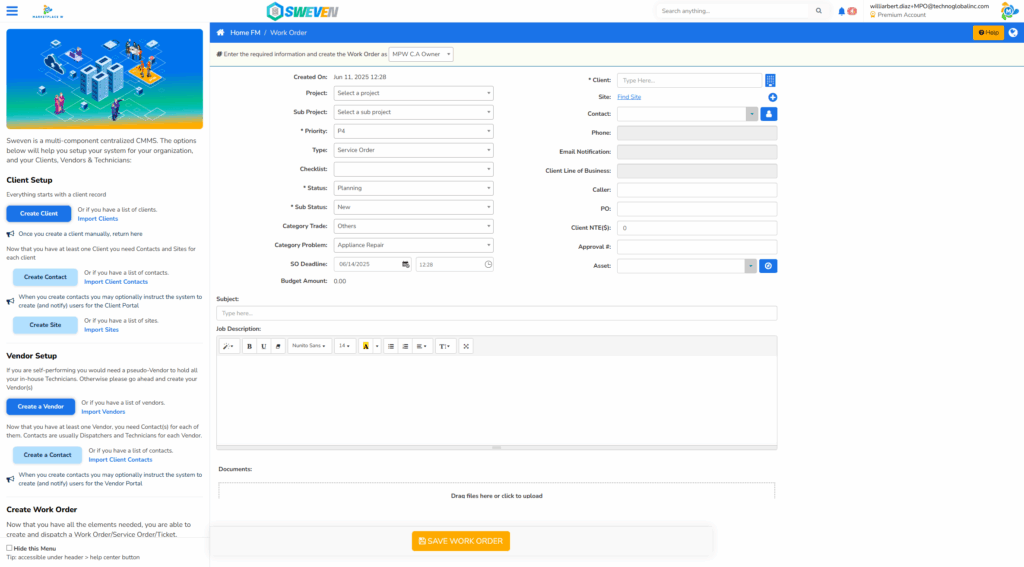
This will also allow for attaching documents to the job description and a larger space to fill up the details of a task.

Quick create WO
Quick Create allows for a simplified entry version, where only the basic information on the task is requested.
This option can be used when you don’t have all the facts related to a task or when you are performing a task that does not require specific information on it.

Once the information in the work order is complete, you may save it by clicking on “Save Work Order” at the bottom of your screen.

Both input methods will create a new work order in the standard Sweven format that can be updated or modified as needed at any point forward.
